Features

Built for serious guitarists

Write it, hear it, play it. Noterix is a tab editor with a full guitar rig inside: amps and pedals, a mixer, a tuner, live playing through your audio interface, and tabs made from what you play.

Amps & EffectsPro & Studio

70 amps, cabinets and pedals

Every one has its own look and its own sound. Pick them from a browser sorted by category, then shape them with real knobs.

14Amps
4Cabinets
13Drive & Distortion
10Modulation
12Pitch & Space
17Filter, Dynamics, Reverb & Delay
  • Amp voicings from sparkling clean and jazz to blues, crunch, stacks and modern high gain
  • 1×12, 2×12, 4×12 and 4×10 cabinets
  • Overdrive, fuzz and voiced drives, chorus, phaser, rotary, octave and pitch drop
  • Compressor, noise gate, wah, graphic EQ, echo and reverbs from room to hall

15 essential effects are included in every plan. All 70 come with Pro and Studio.
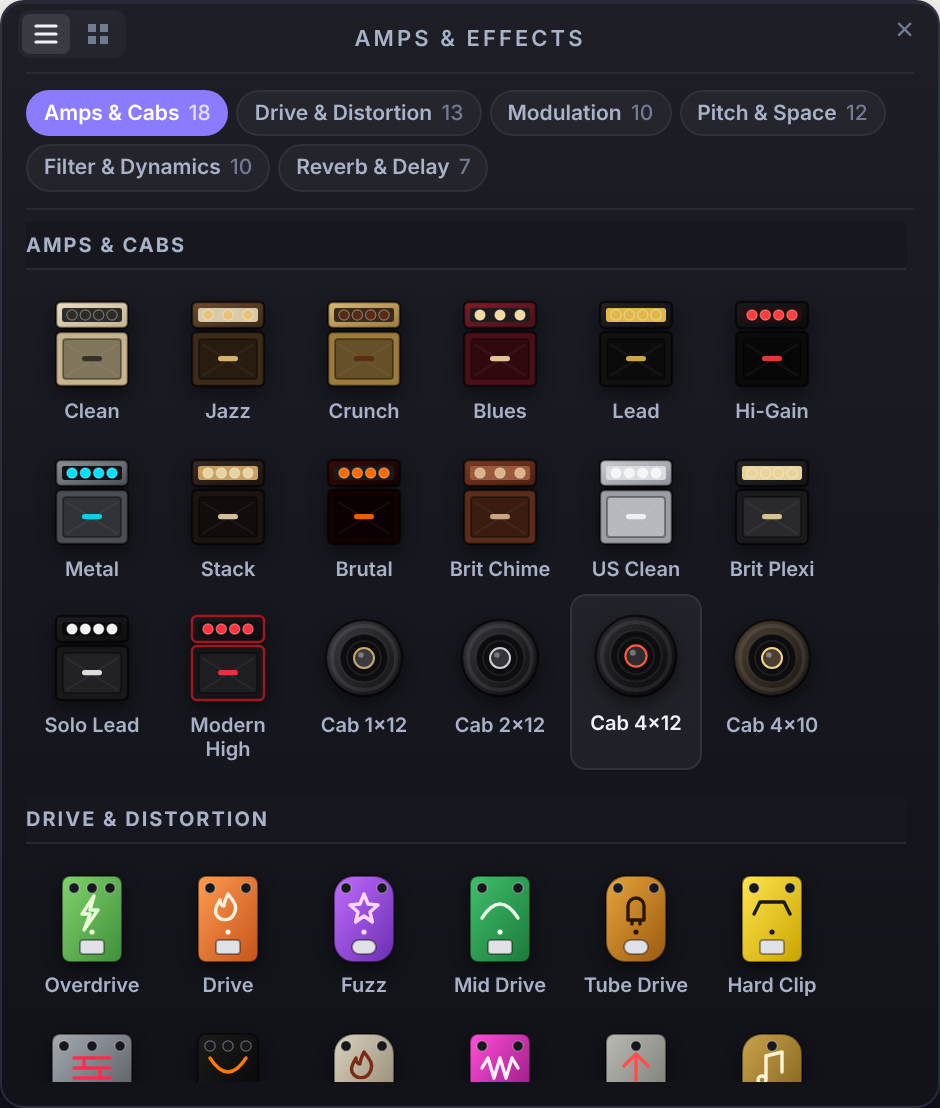
The Amps & Effects browser in Noterix, showing amps and cabinets grouped by category
Pedalboard

A full rig on every track

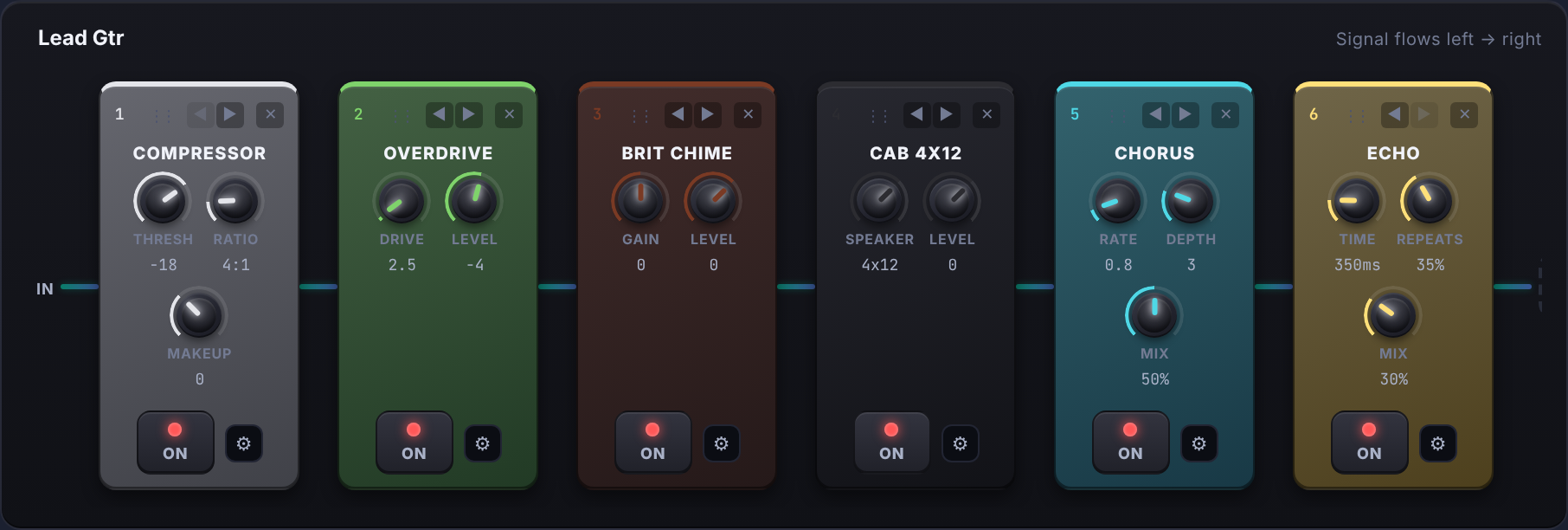
Chain amps and pedals in any order, drag to rearrange, and switch each one on or off. The chain plays on the track and in the exported mix, so what you hear while writing is what you get.

A pedalboard with a compressor, overdrive, amp, cabinet, chorus and echo in a row
Signal flows left to right, from the guitar to the output.
Mixer

A mixer that looks and works like a console

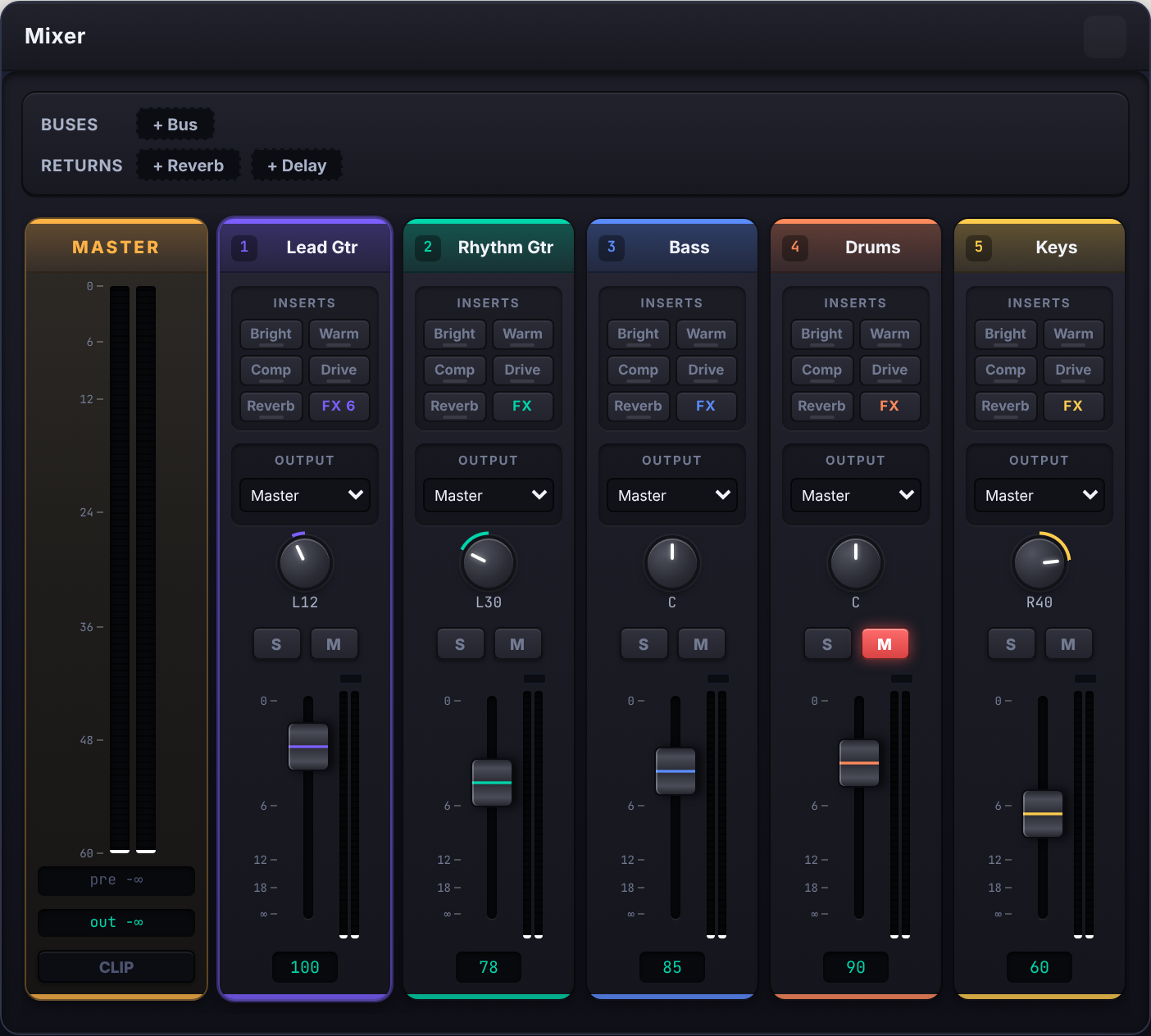
Every track gets its own channel strip with a colour, a pan knob, solo and mute, a fader and a live level meter.

  • Volume, pan, solo and mute on every plan
  • Quick inserts on each strip: Bright, Warm, Comp, Drive, Reverb and the full FX chainPro & Studio
  • Group tracks into buses, and send them to shared reverb and delay returnsPro & Studio
  • Master section with pre and post meters and a clip light
The Noterix mixer with a master strip and five coloured channel strips
Live Guitar NewPro & Studio

Plug in and play through your tone

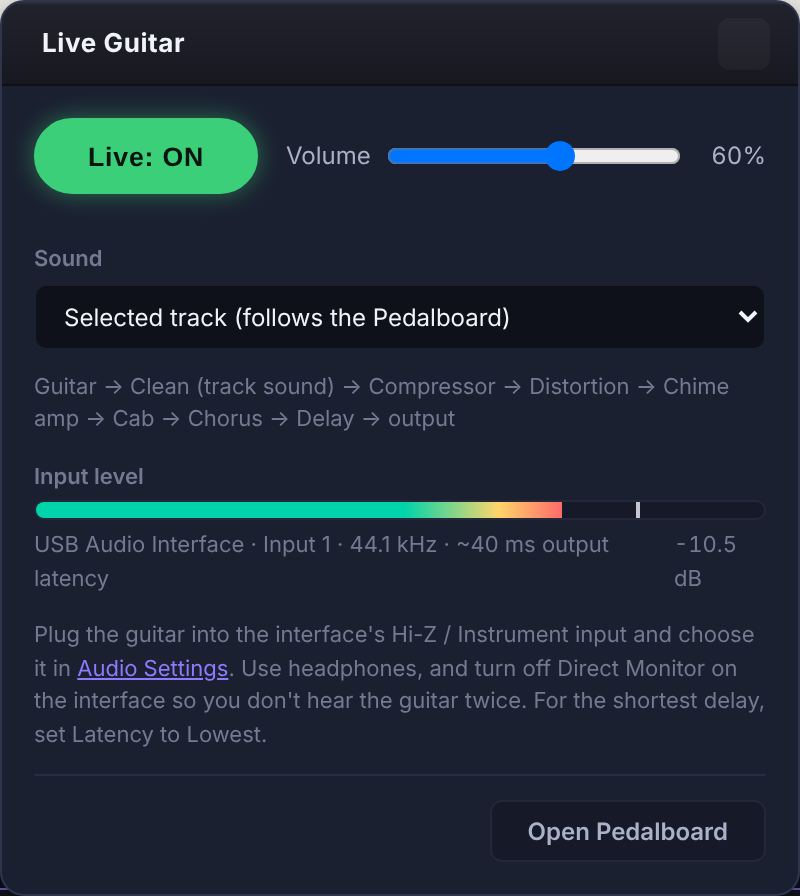
Connect your guitar to an audio interface and play live through the same amp and pedals as the selected track. Jam along with the song, or dial in a sound before you write it down.

Guitar→Compressor→Drive→Amp→Cab→Chorus→Delay→Reverb
  • Follows the selected track's pedalboard, or play a clean tone
  • Live input meter and a volume control
  • Built for headphones and low latency
The Live Guitar panel, switched on, with the signal chain and input level
Audio Interface

Works with your sound card

Choose any input: an audio interface with a Hi-Z instrument input, a USB guitar cable, a looper or a microphone. Noterix uses it for the tuner, Live Guitar and Record to Tab.

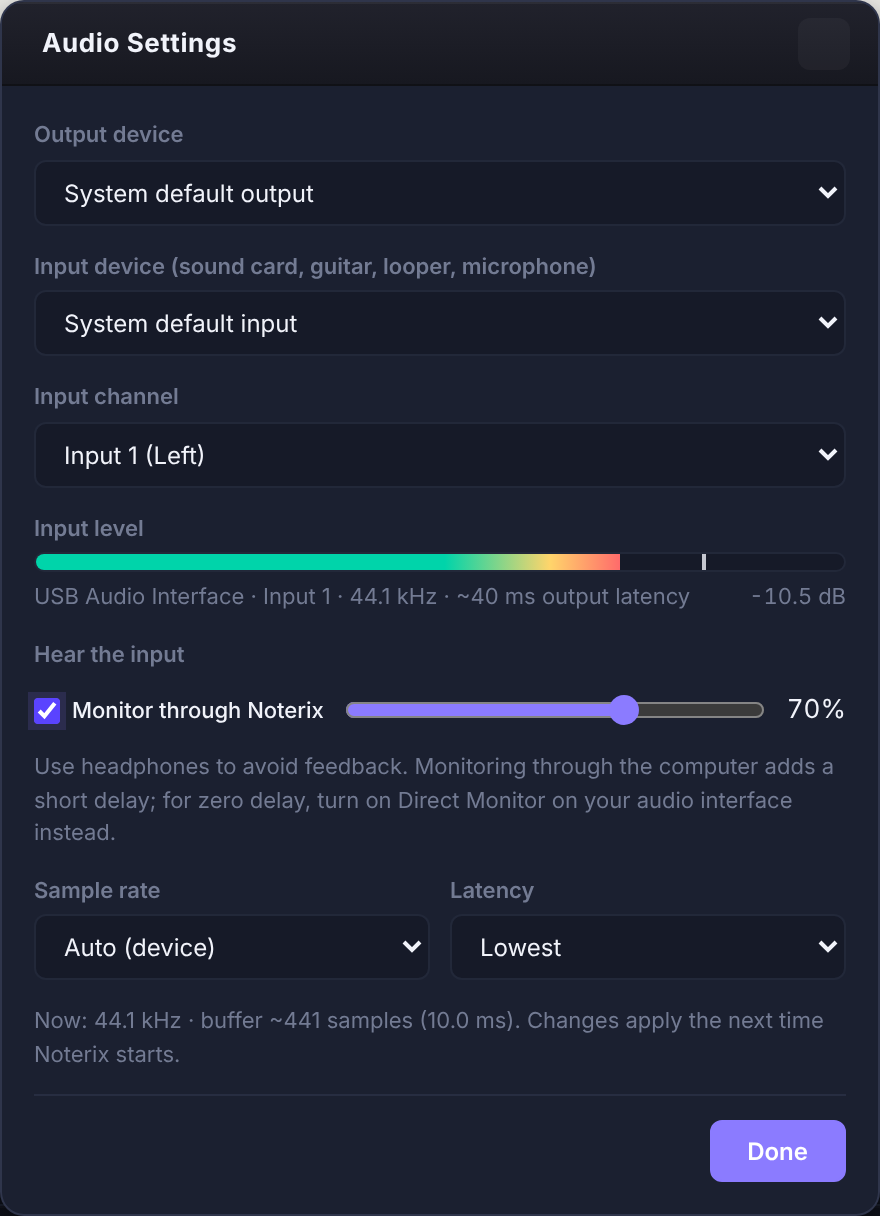
  • Pick the output device, the input device and the input channel
  • Hear the input through Noterix with its own volumePro & Studio
  • Sample rate: Auto, 44.1, 48 or 96 kHz
  • Latency: Lowest, Balanced, or Stable for fewer dropouts
Audio Settings with output and input device, input channel, monitoring, sample rate and latency
TunerEvery plan

A tuner for every string

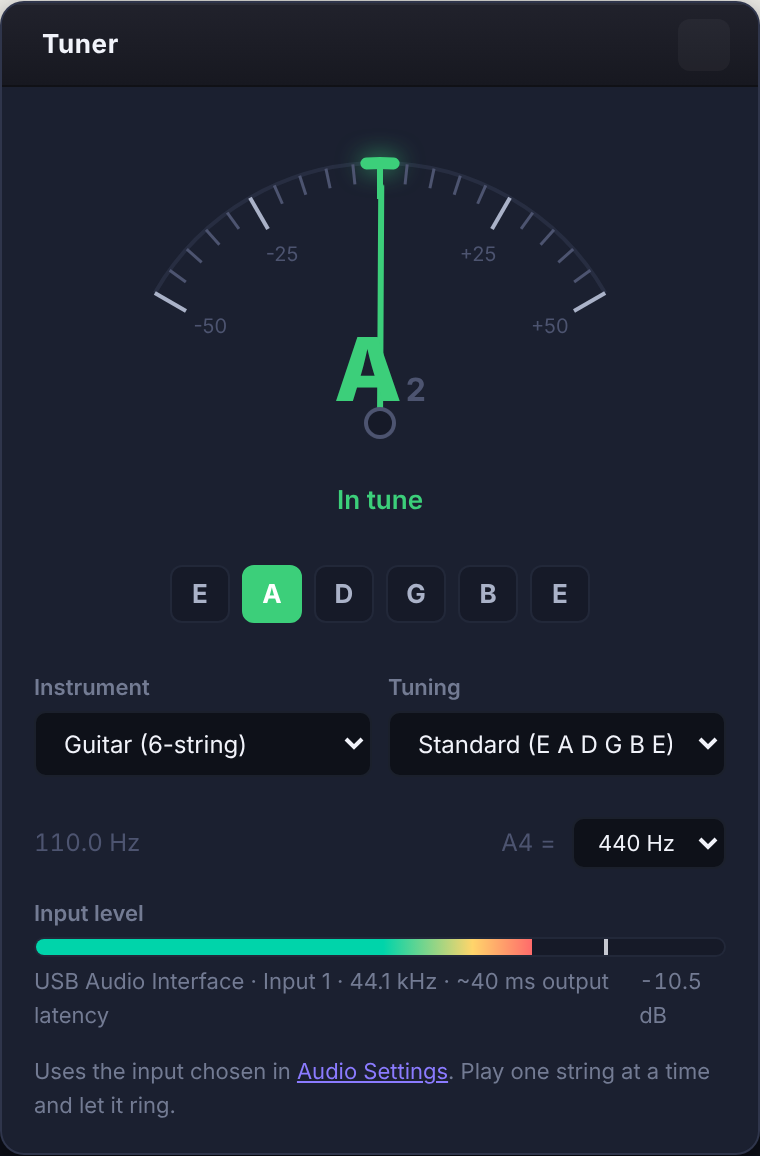
Play one string and let it ring. The needle shows how many cents you are off, the string lights up, and it turns green when you are in tune.

Guitar 6, 7, 8-stringBass 4, 5, 6-stringUkuleleBanjoMandolinViolinCelloChromatic
  • Over 30 tunings: drop D to drop B, DADGAD, open G, D, E and C, low-B bass and more
  • Reference pitch you can change (A4 = 440 Hz by default)
  • Works with an audio interface or your computer's microphone, or matches the tuning of the open track
The Noterix tuner showing the A string in tune
Record to Tab BetaPro & Studio

Play it, and get the tab

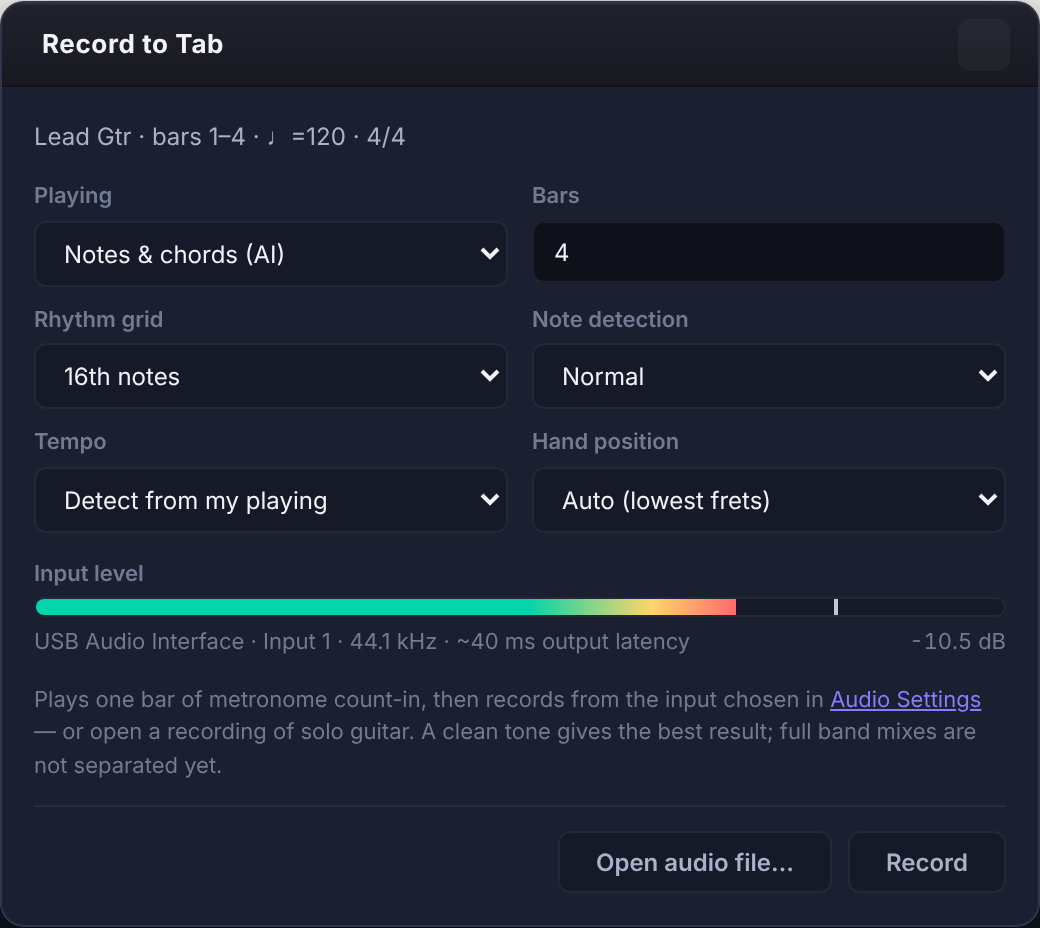
Record yourself after a one-bar count-in, or open a recording of solo guitar. Noterix listens and writes the notes and chords straight into the track.

  • Notes and chords (AI), chord symbols, or single notes
  • Detects your tempo, or follows the metronome
  • Tells strums from single notes and counts the strums in each chord
  • Choose the hand position, from open strings up to the 12th fret

Works best with a clean tone. Full band mixes are not separated yet.

The Record to Tab panel with playing style, bars, rhythm grid, tempo and hand position
Also new

More in the latest versions

Community library

Browse collections and songs other players shared, with small tab previews of each one. Open and download with Pro or Studio, and publish your own with Studio.

Play while it renders

Playback starts right away while the full sound is prepared, and after an edit only the changed part is rendered again.

Hear effects as you play back

Amp tones, pedals and the noise gate are heard in playback, not only in the exported audio.

Everything else

The editor at the heart of it

Professional Notation
Tab & Standard Notation
Full guitar tablature and standard notation rendered simultaneously with pixel-perfect accuracy.
  • Up to 8 simultaneous tracks per score
  • Variable time signatures and key changes
  • All standard guitar articulations: bends, slides, vibrato, tapping
  • Tuplets, grace notes, and complex rhythms
  • Print-ready PDF export
Audio Engine
Realistic playback
Hear every track played back with realistic instruments, articulations and the effects on each track.
  • Guitar-specific articulations: bends, slides, hammer-ons
  • Playback starts while the full sound is rendered
  • Only the part you edited is rendered again
  • Adjustable sample rate (44.1 / 48 / 96 kHz) and latency
  • Tempo changes per bar
Effects Processor
70 amps, cabinets and pedals
A full pedalboard on every track, with classic guitar effects and studio tools. See all of them.
  • 14 amps and 4 speaker cabinets
  • Overdrive, distortion, fuzz and voiced drives
  • EQ, compressor and noise gate
  • Reverbs from room to hall, echo and delay
  • Chorus, phaser, tremolo, rotary, octave and more
Studio Mixer
Multi-Channel Mixing Console
A mixing console built directly into the editor. Take a look.
  • Fader, pan knob and level meter per channel
  • Solo and mute per track
  • Quick inserts, buses, and reverb and delay returns
  • Master metering with a clip light
Guitar Pro Compatibility
Guitar Pro 7/8 (.gp)
Import compatible Guitar Pro 7/8 (.gp) files and open them for editing and playback.
  • Guitar Pro 7/8 (.gp) import
  • Limited support for compatible GPIF-based .gpx files
  • Techniques, tunings and multi-track scores preserved on import
  • Legacy GP3/GP4/GP5 files are not currently supported
Looper & Scheduler
Practice Tools
Built-in practice tools designed to help you master difficult passages and rehearse full songs.
  • Loop any section with a single click
  • Live tempo control: slow down by up to 75% without pitch change
  • Event scheduler for metronome and click track
  • Count-in before playback
Comparison

How Noterix stacks up

See how Noterix compares to other tab editors.

FeatureNoterixGuitar ProTuxGuitar
Guitar Pro file import✓ Full✓ Native◑ Partial
Real-time audio playback✓ Built-in✓ RSE◑ MIDI only
Amp simulation✓ Built-in✓ Built-in✗ None
Effects chain per track✓ Full chain◑ Limited✗ None
Studio mixer✓ Full◑ Basic✗ None
Free trial✓ 7-day trial✗ Paid only✓ Free
Web / browser access✓ Yes✗ Desktop only✗ Desktop only
Cross-platform◑ Coming soon✓ Win/Mac✓ Win/Mac/Linux

Ready to compose?

Download Noterix and start your first song in minutes.